Data-Heavy Workflow
User Trust
Manual Process Automation
Data Entry

Establishing a Central Hub for Fragmented Recruiting Data

Project Overview
Designed product enhancements that enabled hospital coordinators to automate the sharing of complex medical hiring data, reducing manual input and enabling faster candidate sourcing.
The Problem
Medical account managers were struggling to make provider data shareable and easy to navigate across a team of recruiters. This was causing delays at all stages of recruiting, and occasionally led to inaccurate information being shared during provider onboarding.
Lack of Cooperation Between Tools
The average user was juggling 4+ tools and databases to keep track of all the provider data required for the recruiting process. Most of these tools weren't compatible with each other, forcing users to login and search multiple databases to get a complete picture of a provider. This led users to create and maintain their own mini-databases of provider data in Excel.
Data Wasn't Relevant to User Priorities
Most of the data stored in the product started out broad and generic. Reaching data for a specific user role would often require 5+ clicks across 2 or 3 pages.
An Overwhelming Quantity of Data
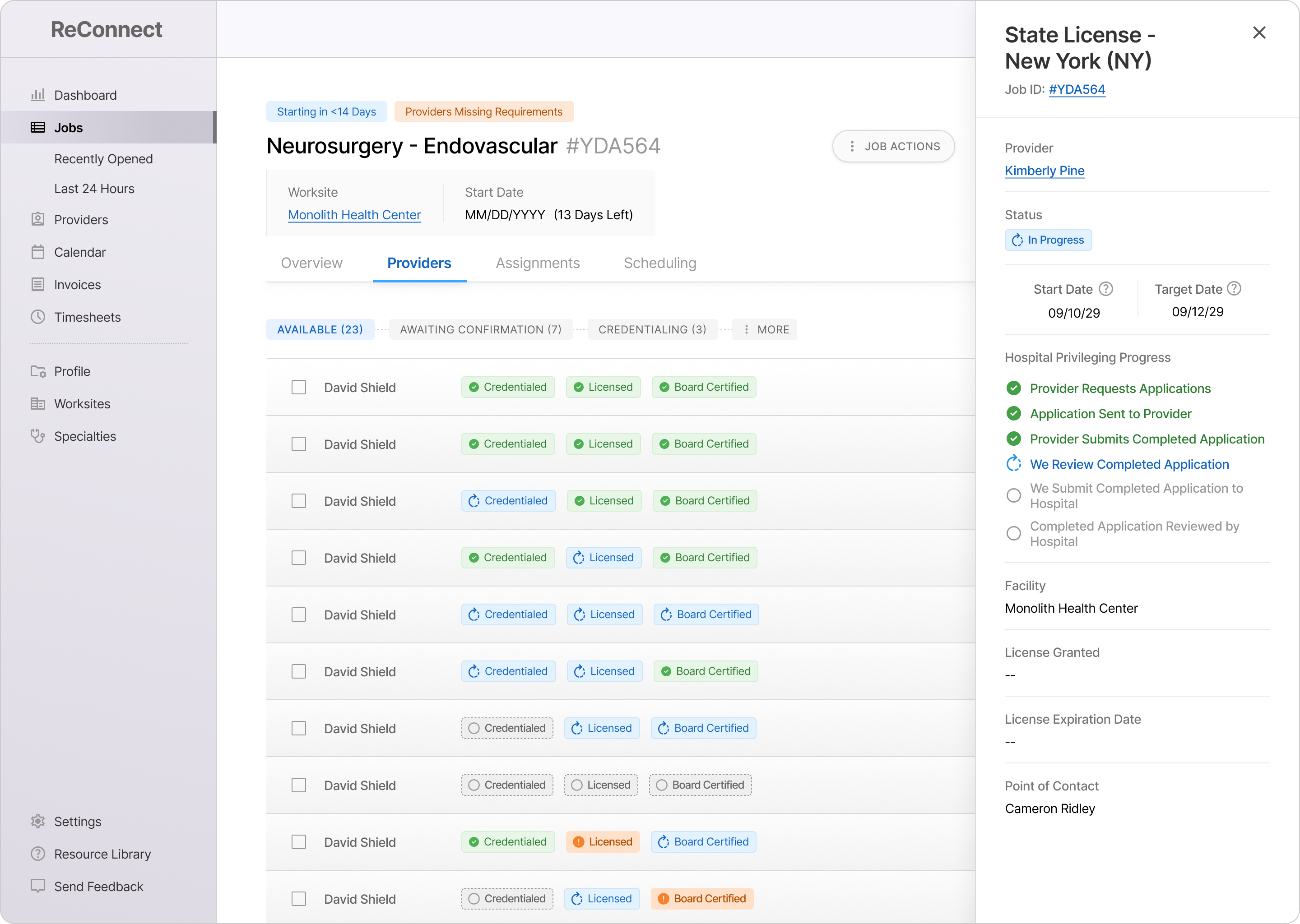
Each provider has at least 8 core hiring requirements in addition to 50+ data points covering education, specific licenses and board certifications, and more. Some receive status updates from various internal departments and external organizations. And users must verify the progress and completion of all of these items individually, at multiple steps throughout a provider's onboarding.
The Solutions
Enable Seamless Navigation Between User Tools
The average user was juggling 4+ tools and databases to keep track of all the provider data required for the recruiting process. Most of these tools weren't compatible with each other, forcing users to login and search multiple databases to get a complete picture of a provider. This led users to create and maintain their own mini-databases of provider data in Excel.
Ensure Instant Access to High-Priority Data
Most of the data stored in the product started out broad and generic. Reaching data for a specific user role would often require 5+ clicks across 2 or 3 pages.
Simplify the Hierarchy of Data
Advanced Modules - Detailed progress tracking for all requirements. The most comprehensive data the product offers before deep-linking to other systems.
Summaries - Short, in-context summaries of the last update and next step on a requirement.
Highlights - Bite-sized, scannable data communicating the status of various provider attributes with icons, color, and typography.
95%
of Intake Form Automated
Small Clients (<10 Worksites)
67%
of Intake Form Automated
Small Clients (<10 Worksites)
25%
of Intake Form Automated
Small Clients (<10 Worksites)
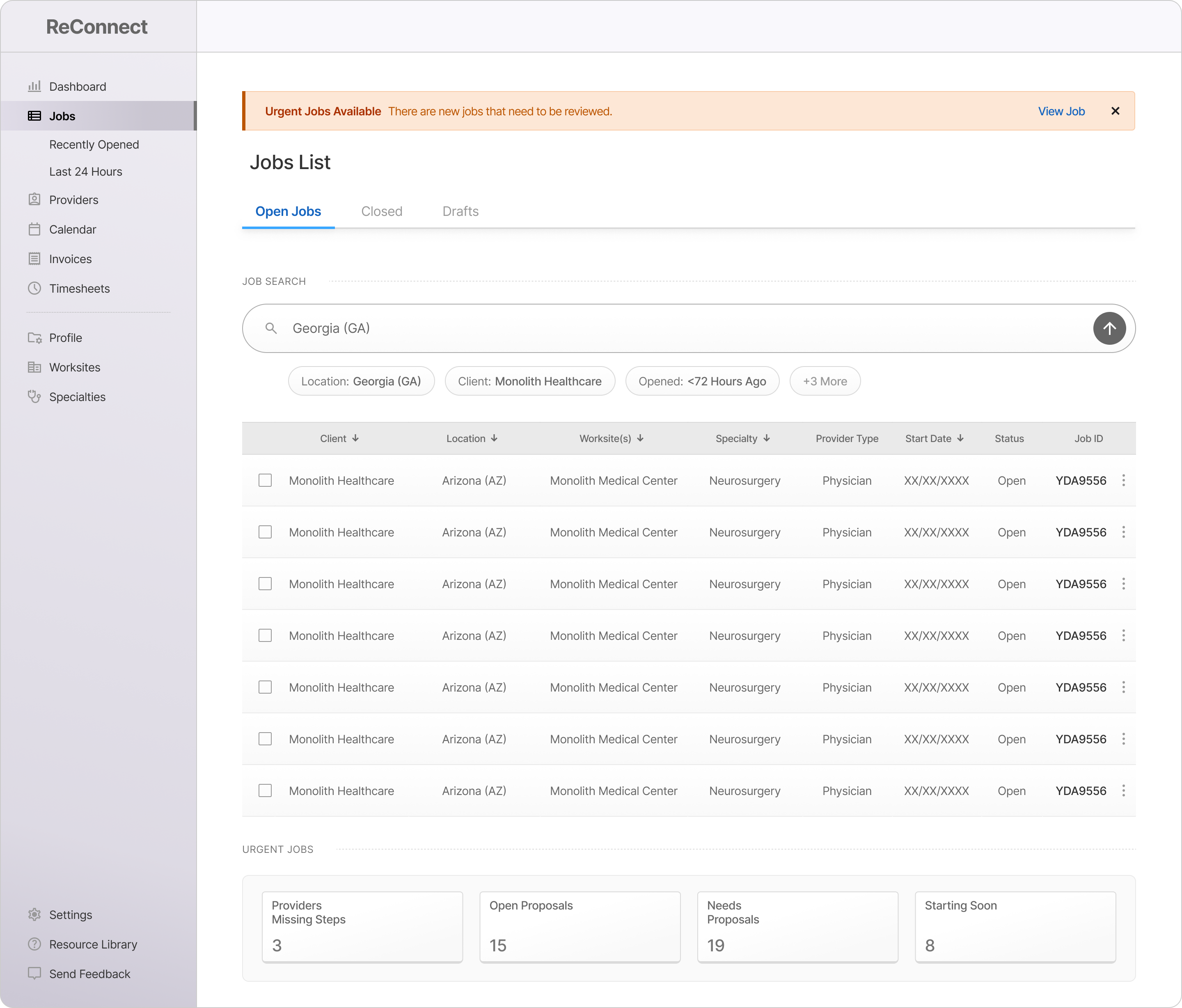
Search by: Job ID / Worksite / Specialty / etc.
Clear Filters
Clear Filters
Clear Filters
Job Search Bar: Enabling Deep, Complex Filtering
Enhanced job filtering by allowing users to type out several categories of filters seamlessly. Designed for quick filtering of 3+ data points.
Reduced Clicks from 3 to 1 per Each Filter Added (Compared to Table Column Filters)
Users could add separate filters with semi-colons, enabling several filters to be added with 1 click.
Neurosurgery - Endovascular
#YDA956
Start Date:
Oct 29, 2028
Client:
Monolith Healthcare
Worksite(s)
Monolith Family Medical Center
Neurosurgery - Endovascular
#YDA956
Start Date:
Oct 29, 2028
Client:
Monolith Healthcare
Worksite(s)
Monolith Family Medical Center
Neurosurgery - Endovascular
#YDA956
Start Date:
Oct 29, 2028
Client:
Monolith Healthcare
Worksite(s)
Monolith Family Medical Center
Job Cards: A Mobile-Friendly UI for Job Table Data
Created a designated UI for job listings, allowing jobs to be shown in a condensed format (compared to a table) in smaller datasets and on smaller devices.
Prioritizes Specialty and Start Date, two of the most distinct parts of each job (according to users)
Reduced the minimum screen size required for displaying job listings by >50%
Providers Missing Steps
22
Open Proposals
14
Needs Proposals
8
Starting within 14 Days
17
Urgent Jobs / Priority Panels: A Window Into the Bigger Picture
Designed to give users quick visibility and access into high-priority job categories set by their teams. Brings user to a filtered list of jobs based on the category.
Uses hard-coded logic to filter jobs by criteria that our standard table filters didn't support.
Catches urgent jobs as they become available, saving users from having to keep track.

Export Providers As:

.csv

.pdf

.jpg

Export Provider

Data Export: Bridging the Gap Between Tools
Allowed users to export provider data into Excel and a variety of visual formats. Designed to enable sharing of providers with hiring managers.
Offered raw .csv files so users could integrate their data into Excel workflows outside of the product
Offered .pdf and .jpg formats to let users generate professional provider presentations using our UI
Search by: Job ID / Worksite / Specialty / etc.
Clear Filters
Clear Filters
Clear Filters
Job Search Bar: Enabling Deep, Complex Filtering
Enhanced job filtering by allowing users to type out several categories of filters seamlessly. Designed for quick filtering of 3+ data points.
Reduced Clicks from 3 to 1 per Each Filter Added (Compared to Table Column Filters)
Users could add separate filters with semi-colons, enabling several filters to be added with 1 click.
Neurosurgery - Endovascular
#YDA956
Start Date:
Oct 29, 2028
Client:
Monolith Healthcare
Worksite(s)
Monolith Family Medical Center
Neurosurgery - Endovascular
#YDA956
Start Date:
Oct 29, 2028
Client:
Monolith Healthcare
Worksite(s)
Monolith Family Medical Center
Neurosurgery - Endovascular
#YDA956
Start Date:
Oct 29, 2028
Client:
Monolith Healthcare
Worksite(s)
Monolith Family Medical Center
Job Cards: A Mobile-Friendly UI for Job Table Data
Created a designated UI for job listings, allowing jobs to be shown in a condensed format (compared to a table) in smaller datasets and on smaller devices.
Prioritizes Specialty and Start Date, two of the most distinct parts of each job (according to users)
Reduced the minimum screen size required for displaying job listings by >50%
Providers Missing Steps
22
Open Proposals
14
Needs Proposals
8
Starting within 14 Days
17
Urgent Jobs / Priority Panels: A Window Into the Bigger Picture
Designed to give users quick visibility and access into high-priority job categories set by their teams. Brings user to a filtered list of jobs based on the category.
Uses hard-coded logic to filter jobs by criteria that our standard table filters didn't support.
Catches urgent jobs as they become available, saving users from having to keep track.

Export Providers As:

.csv

.pdf

.jpg

Export Provider

Data Export: Bridging the Gap Between Tools
Allowed users to export provider data into Excel and a variety of visual formats. Designed to enable sharing of providers with hiring managers.
Offered raw .csv files so users could integrate their data into Excel workflows outside of the product
Offered .pdf and .jpg formats to let users generate professional provider presentations using our UI
The Impact
Big-picture victories that resulted from this project. These are broad themes that were targeted based on user interviews and past feedback.
Comprehensive Provider Data
in Fewer Than 3 Clicks
Workflows Impacted
Small + Medium Clients (>25 Worksites)
Comprehensive Data Access
without External Logins
Features Impacted
Opening + Duplicating a New Job
Closed Most Workflow Gaps Requiring Users to Exit Product
Features Impacted
All Job Submission Features
95%
of Intake Form Automated
Small Clients (<10 Worksites)
67%
of Intake Form Automated
Small Clients (<10 Worksites)
25%
of Intake Form Automated
Small Clients (<10 Worksites)
The Impact
Hospital staffing coordinators were allowing multiple days to pass without submitting job requirements to recruiters.
Intake Forms
Completely Automated
Small-Scale Clients (<10 Worksites)
Ended Accidental
Data Loss
Small-Scale Clients (<10 Worksites)
Integrated Three Core User Journeys into Design System
Small-Scale Clients (<10 Worksites)
95%
of Intake Form Automated
Small Clients (<10 Worksites)
67%
of Intake Form Automated
Small Clients (<10 Worksites)
25%
of Intake Form Automated
Small Clients (<10 Worksites)
The Outcomes
Hospital staffing coordinators were allowing multiple days to pass without submitting job requirements to recruiters.
95%
of Intake Form Automated
Small Clients (<10 Worksites)
67%
of Intake Form Automated
Small Clients (<10 Worksites)
25%
of Intake Form Automated
Small Clients (<10 Worksites)
95%
Small-Scale Clients (<10 Worksites)
67%
Small-Scale Clients (<10 Worksites)
33%
Small-Scale Clients (<10 Worksites)
The Numbers
2x
Quantity of Data Available
Per Provider
80%
# of Clicks
to Access External Data
40%
# of Page-Loads
to Access Internal Provider Data
95%
of Intake Form Automated
Small Clients (<10 Worksites)
67%
of Intake Form Automated
Small Clients (<10 Worksites)
25%
of Intake Form Automated
Small Clients (<10 Worksites)