Return to Home Page
Data-Heavy
Automation
Multi-page Form
Data Entry
Design System
Project 02
2023 - 2024
Data-Heavy
Automation
Multi-page Form
Data Entry
Design System
Project 02
2023 - 2024

Streamlining Hiring Intake By Automating Data Entry

Project Overview
Accelerated candidate sourcing by replacing manual data entry with a modular, product-wide automation strategy.
Project Overview
Automated intake processes and enabled faster candidate sourcing by allowing users to bypass manual data entry.
The Problem
Hospital staffing coordinators were delaying job submissions by days, missing the critical 72-hour recruiting window. The friction of manual entry forced them to "batch" their work, creating bottlenecks that slowed down the entire hiring pipeline.
Fear of Data Loss
Because the system lacked autosave, users were hoarding job requirements offline until they had time to submit them in one safe, uninterrupted sitting. This behavior delayed recruiting and increased the risk of error.
Fragmented Architecture
The product used four distinct interfaces for the same dataset (Create, Edit, Expand, Details). This inconsistency increased cognitive load for users and created "development debt," as every UI update had to be re-implemented across four different codebases.
Manual Redundancy
Opening a new role required copy-pasting dozens of fields from previous documents. Users were wasting hours on low-value data re-entry rather than focusing on high-value coordination.
Safety Nets & Drafts
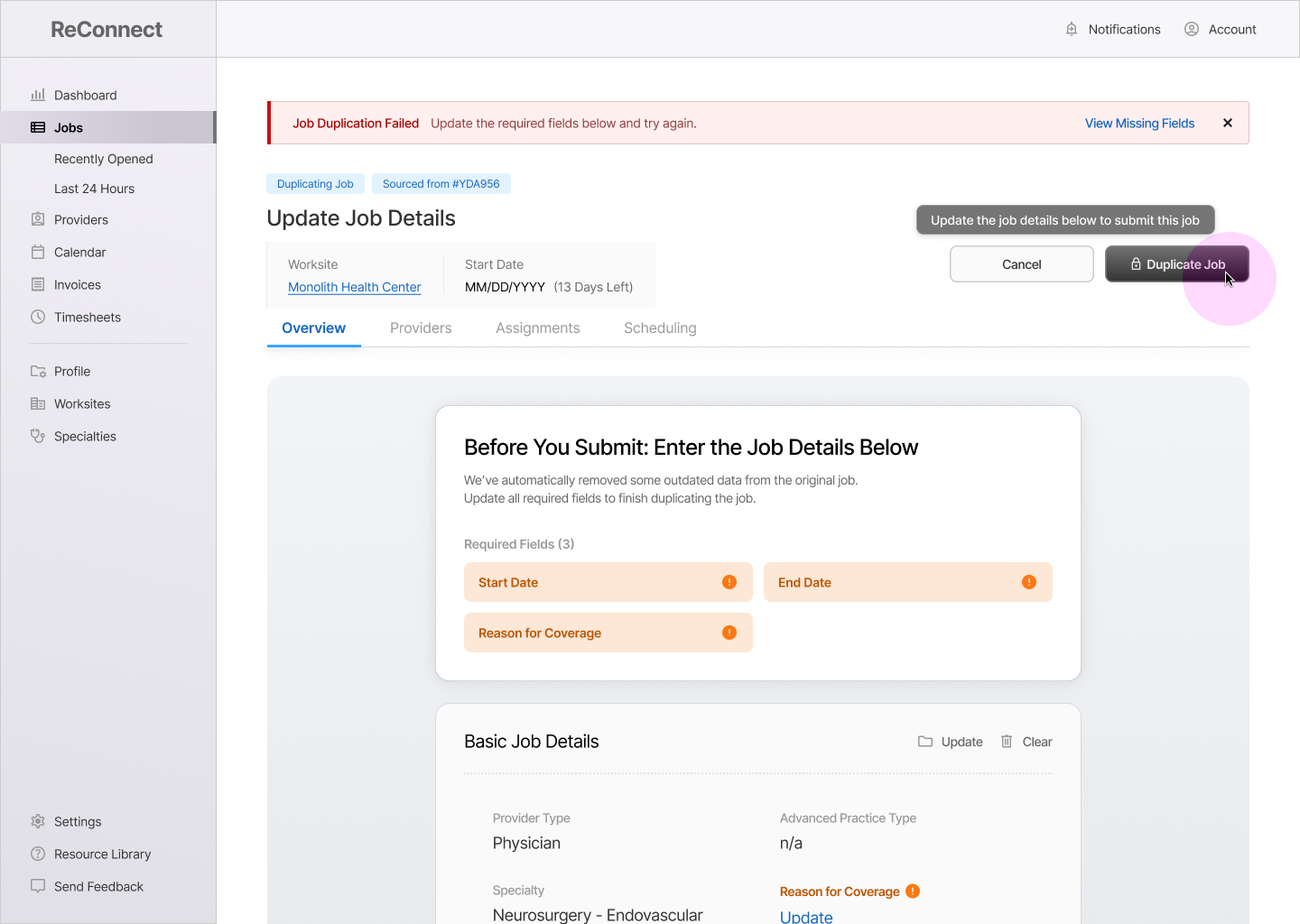
To stop users from hoarding work, we implemented a robust draft system with auto-save and expiration reminders. We paired this with "Review Screens" that force a data-hygiene check before submission, dynamically flagging outdated fields or missing requirements.
Universal Intake Architecture
We consolidated four disparate interfaces into a single, modular intake system. This "write once, deploy everywhere" approach standardized the UX patterns and allowed the form to dynamically adapt its content based on the user's intent (Create vs. Edit vs. Duplicate).
Automated "Job Duplication"
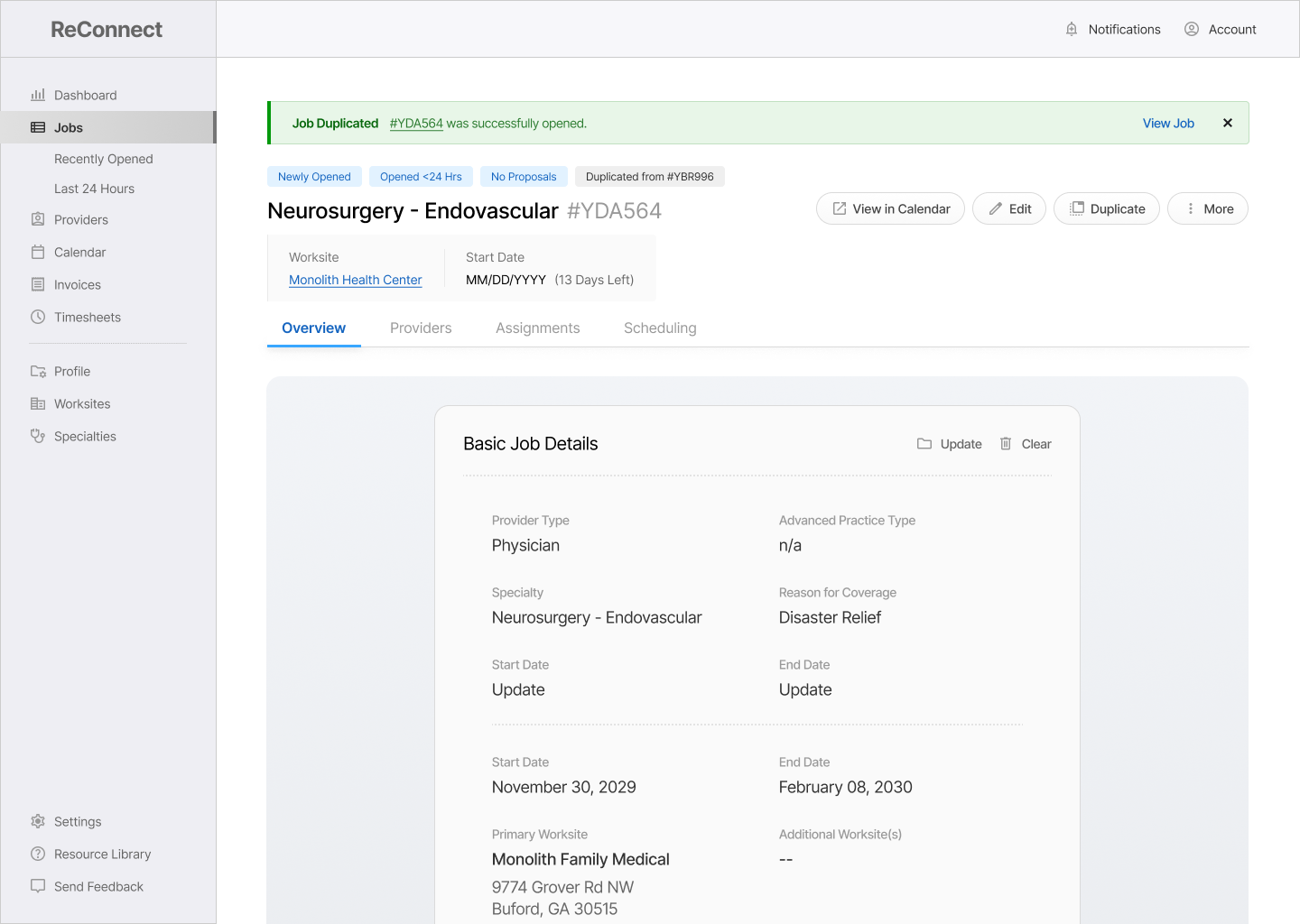
I introduced a duplication workflow that allows users to import 80% of a new job’s criteria from existing records. This shifted the user’s role from "data entry" to "data review," reducing clicks and page loads by ~70%.
Importing Job Data
(#YDA956)
Provider Type
Advanced Practice Type
Start Date
End Date
Reason for Coverage
Worksite(s)
Requested Provider(s)
Contact Name(s)
Automated Data Entry: Minimizing Human Effort (and Error)
Shifted data entry from manual input to automated, with users only entering data for corrections or key info (reason for coverage, work schedule, etc.)
Enabled over 80% of data entry to be automated by  importing old job data.
Resulted in ~70% Reductions in 3 Key Metrics (Completion Time, Clicks, and Page-Loads)
Update the Job Details below
We’ve automatically removed some outdated data from the original job.
Update all required fields to finish duplicating the job.
Required Fields (3)
Start Date
End Date
Reason for Coverage
Required Fields (3)
Review Screens: Making Data Hygiene Mandatory
Introduced screens and components that reduced data errors by "forcing" users to stop, review, and make updates to their work before submitting.
Complete / Incomplete status of required fields is displayed dynamically for users
Modular UI allows the card to grow or shrink based on which sections need attention.
Job Draft Saved
(#YDA956)
View Draft
Are you sure you want to leave?
A draft of this job will be saved for 30 calendar days.
Keep Working
Save and Quit
User Drafts: A Safety Net for Complex Work in Progress
Prompts users with the option to save a draft when quitting the intake form, or automatically stores a draft if the user has closed the browser.
Users are sent in-app notifications and email reminders as drafts get closer to expiring.
With drafts, users could pre-fill easy sections of the intake form while they gathered more info.
Importing Job Data
(#YDA956)
Provider Type
Advanced Practice Type
Start Date
End Date
Reason for Coverage
Worksite(s)
Requested Provider(s)
Contact Name(s)
Automated Data Entry: Minimizing Human Effort (and Error)
Shifted data entry from manual input to automated, with users only entering data for corrections or key info (reason for coverage, work schedule, etc.)
Enabled over 80% of data entry to be automated by  importing old job data.
Resulted in ~70% Reductions in 3 Key Metrics (Completion Time, Clicks, and Page-Loads)
Update the Job Details below
We’ve automatically removed some outdated data from the original job.
Update all required fields to finish duplicating the job.
Required Fields (3)
Start Date
End Date
Reason for Coverage
Required Fields (3)
Review Screens: Making Data Hygiene Mandatory
Introduced screens and components that reduced data errors by "forcing" users to stop, review, and make updates to their work before submitting.
Complete / Incomplete status of required fields is displayed dynamically for users
Modular UI allows the card to grow or shrink based on which sections need attention.
Job Draft Saved
(#YDA956)
View Draft
Are you sure you want to leave?
A draft of this job will be saved for 30 calendar days.
Keep Working
Save and Quit
User Drafts: A Safety Net for Complex Work in Progress
Prompts users with the option to save a draft when quitting the intake form, or automatically stores a draft if the user has closed the browser.
Users are sent in-app notifications and email reminders as drafts get closer to expiring.
With drafts, users could pre-fill easy sections of the intake form while they gathered more info.
95%
of Intake Form Automated
Small Clients (<10 Worksites)
67%
of Intake Form Automated
Small Clients (<10 Worksites)
25%
of Intake Form Automated
Small Clients (<10 Worksites)
The Impact
Big-picture victories that resulted from this project. These are broad themes that were targeted based on user interviews and past feedback.
Completely Automated
Intake Forms
Users Impacted
Small + Medium Clients (>25 Worksites)
Phased Out Data Entry,
Shifted to Batch Data Review
Features Impacted
Opening + Duplicating a New Job
A Single, Branching Form
for All Job Intake Data
Features Impacted
All Job Submission Features
Ended Accidental Data Loss
Features Impacted
Opening a New Job
95%
of Intake Form Automated
Small Clients (<10 Worksites)
67%
of Intake Form Automated
Small Clients (<10 Worksites)
25%
of Intake Form Automated
Small Clients (<10 Worksites)
The Impact
Hospital staffing coordinators were allowing multiple days to pass without submitting job requirements to recruiters.
Intake Forms
Completely Automated
Small-Scale Clients (<10 Worksites)
Ended Accidental
Data Loss
Small-Scale Clients (<10 Worksites)
Integrated Three Core User Journeys into Design System
Small-Scale Clients (<10 Worksites)
95%
of Intake Form Automated
Small Clients (<10 Worksites)
67%
of Intake Form Automated
Small Clients (<10 Worksites)
25%
of Intake Form Automated
Small Clients (<10 Worksites)
The Outcomes
Hospital staffing coordinators were allowing multiple days to pass without submitting job requirements to recruiters.
95%
of Intake Form Automated
Small Clients (<10 Worksites)
67%
of Intake Form Automated
Small Clients (<10 Worksites)
25%
of Intake Form Automated
Small Clients (<10 Worksites)
95%
Small-Scale Clients (<10 Worksites)
67%
Small-Scale Clients (<10 Worksites)
33%
Small-Scale Clients (<10 Worksites)
The Numbers
83%
Task Completion Time
Opening a New Job
67%
Clicks + Page-Loads
Opening a New Job
80%
Development Assets
Job Intake (Post-Design System)
95%
of Intake Form Automated
Small Clients (<10 Worksites)
67%
of Intake Form Automated
Small Clients (<10 Worksites)
25%
of Intake Form Automated
Small Clients (<10 Worksites)