Data-Heavy Workflow
User Trust
Manual Process Automation
Data Entry

Visualizing Medical Credentials for Faster License Reviewing

Project Overview
Designed product enhancements that enabled hospital coordinators to automate the sharing of complex medical hiring data, reducing manual input and enabling faster candidate sourcing.
The Problem
For hospital coordinators, the process of narrowing down providers for roles was time-consuming and mentally draining. On average, a single a job with 20+ providers could require anywhere from 4 to 8 hours of review time.
No Standardized Formatting for Provider Data
Each applicant came with a 3-6 page proposal covering their expertise and dozens of credentials. The lack of standard formatting made it difficult to quickly identify the location and status of high-priority info without reading through every page of the provider proposal in detail.
Large Quantities of Data Per Provider
Reviewing a single provider involved evaluating the status of 8+ hiring requirements covering 50+ different types of professional licenses and certifications, in addition to info about their education and previous working experiences. It could take 10-15 minutes to review all of this information for one provider, with anywhere from 20-50 providers to review per job. On the short end, reviewing them all might take a couple of hours. On the long end, it could take days.
Difficulty Comparing Providers
Because provider proposals were presented in a text-heavy format, users couldn't easily compare provider qualifications side-by-side. This forced users to review every provider in detail before narrowing down the pool.
The Solutions
Create Standardized Provider Summaries
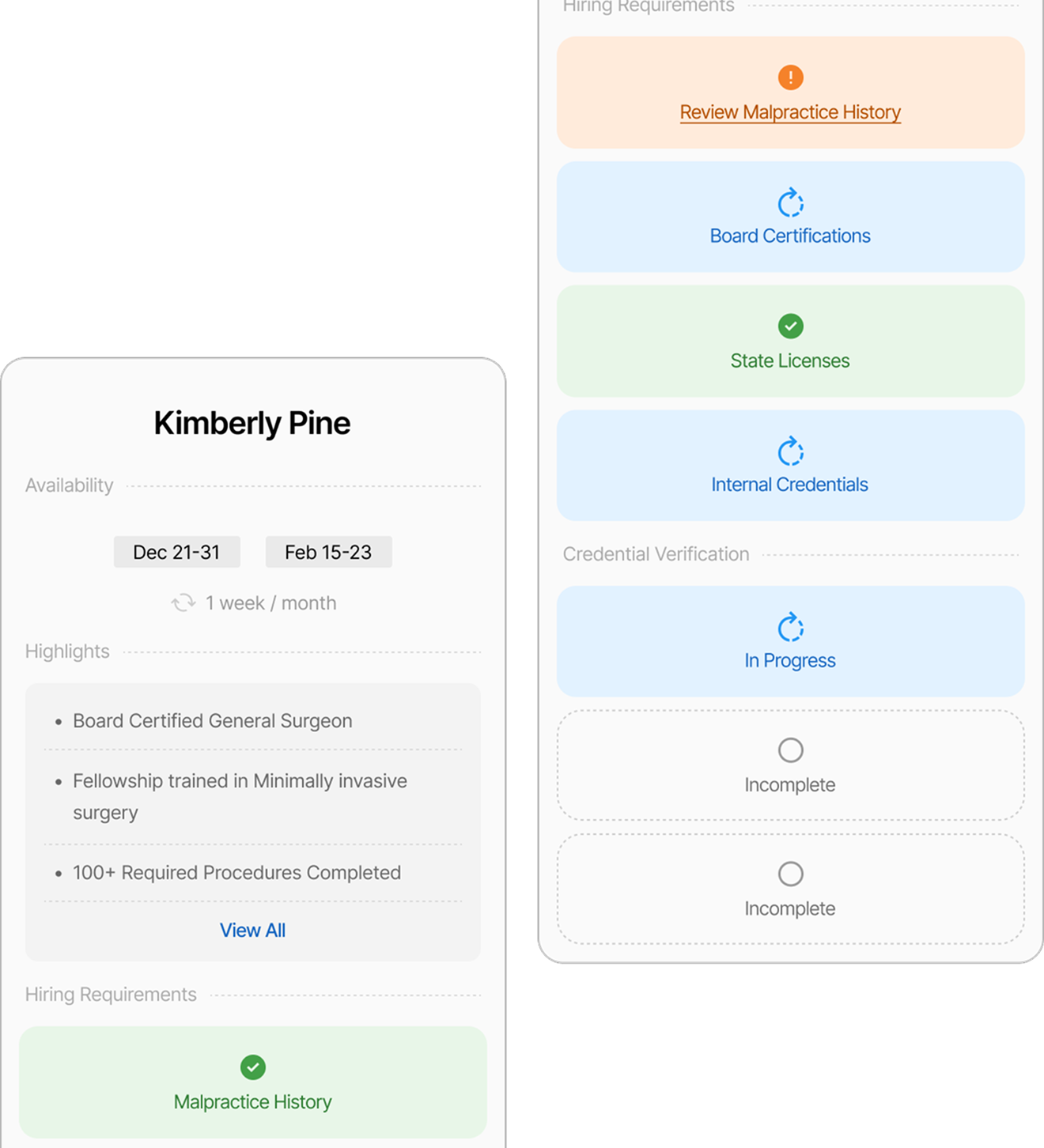
Identified 8+ high-priority provider requirements and compiled them into provider summaries, giving users one-click access to critical data in a short, consistent format. By integrating these requirements within the UI, users could scan the data without even having to open the provider proposals.
Make Provider Data Scannable
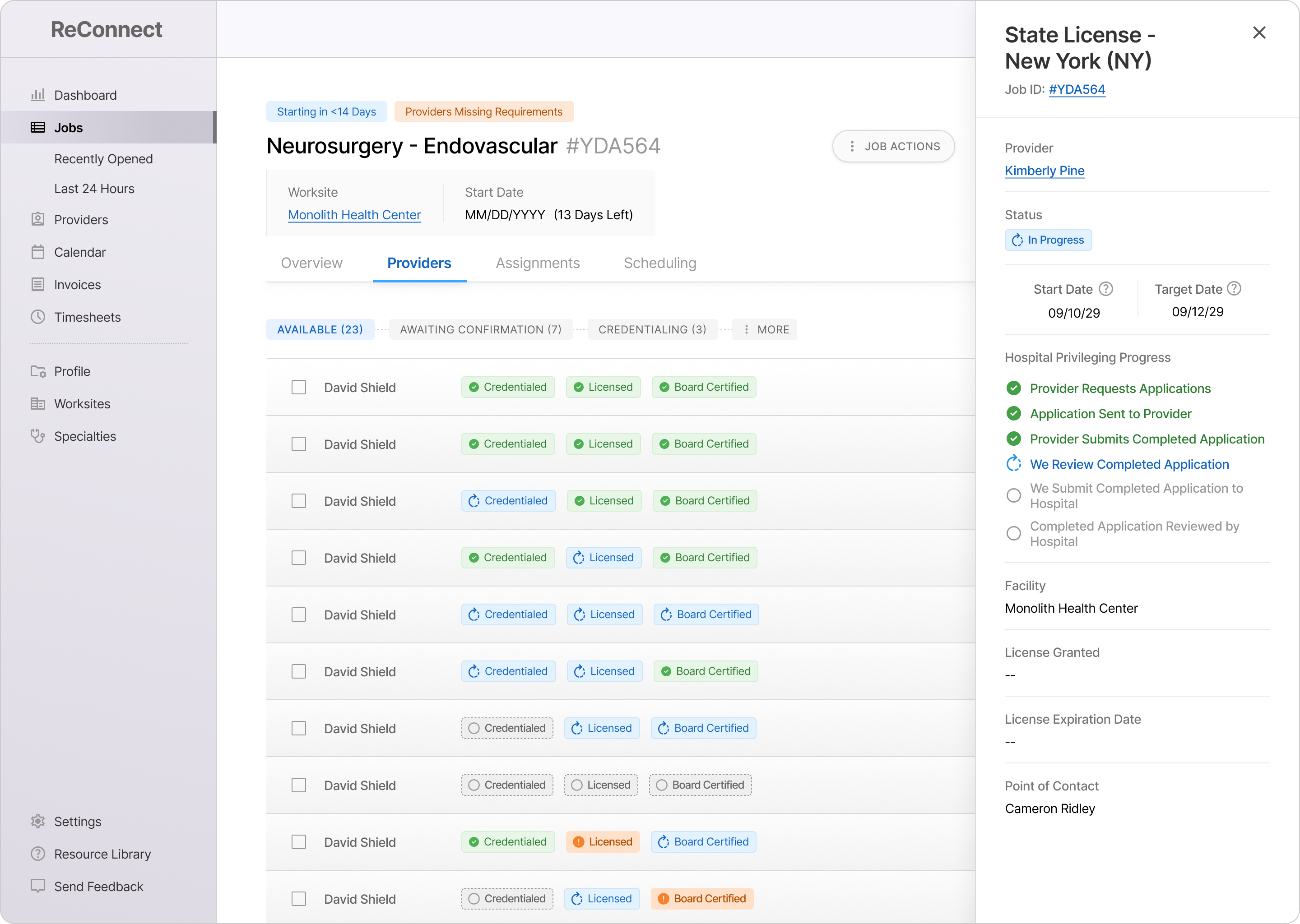
Created a system of badges (colors, icons, and labels) that enabled simple progress updates for 50+ provider requirements / license types to be displayed in the UI.
Badges were structured as a 3-step progression (Incomplete, In Progress, Complete) with room for 2 edge-case states (Exceptions and Possible Red Flags). The badges provided instant visibility into the progress of every provider's key requirements without having to click anything.
Enable Visual Comparison of Provider Data
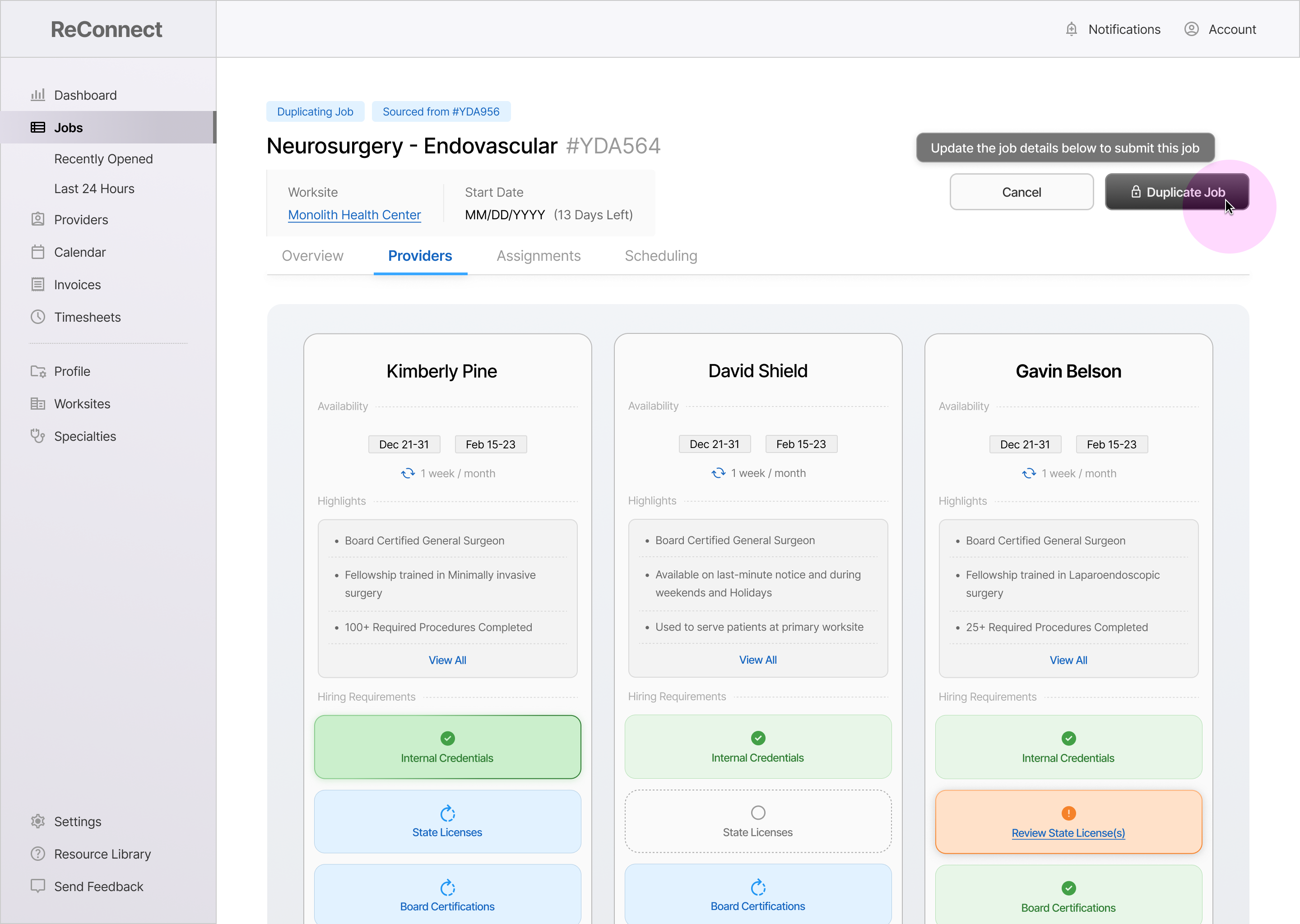
Gave users the ability to generate interactive charts comparing up to 3 providers' schedules, credentials, and progress on hiring requirements.
95%
of Intake Form Automated
Small Clients (<10 Worksites)
67%
of Intake Form Automated
Small Clients (<10 Worksites)
25%
of Intake Form Automated
Small Clients (<10 Worksites)
Required Item
Malpractice History
Status
Review Proposal
Click to View Proposal
Required License #1
Georgia (GA) License
Progress
In Progress
Required License #2
Minnesota (MN) License
Progress
Complete
Click to View All Details
Summary Panels on Hover: A Peek Into Complex Data
Displayed a short summary of the document(s) associated with a specific hiring requirement, including the last update and next step (when available).
Displays up to 3 key data points per requirement, with complete detail available upon clicking.
Provides expanded data without forcing the user to leave the page or view a specific provider.
Board Certification -
ABPN
In Progress
Current Status:
Application Submitted
(Oct 28, 2030)
Next Step:
Facility Confirms Acceptance
State License
In Progress
Current Status:
Application Submitted
(Oct 28, 2030)
Next Step:
Facility Confirms Acceptance
Job Requirement Cards: Capturing the Essential Details
Designed to give the user a complete snapshot into the status of 4+ key job requirements without having to click for additional info.
Gave users visibility into progress updates for 20+ providers without leaving the job page.
Reduced Clicks by 50% and Page-Loads to 0
(Accessing Requirement Updates)
Provider Comparison Grids: Making Complex Data Visual & Interactive
Gives the user an interactive birds-eye view for evaluating providers, allowing the user to hover over and click through details rather than read provider proposals.
Eliminated the need to manually create provider presentations in Excel
A live demonstration of this feature in Beta helped secure a $1 Million Client Contract
Required Item
Malpractice History
Status
Review Proposal
Click to View Proposal
Required License #1
Georgia (GA) License
Progress
In Progress
Required License #2
Minnesota (MN) License
Progress
Complete
Click to View All Details
Summary Panels on Hover: A Peek Into Complex Data
Displayed a short summary of the document(s) associated with a specific hiring requirement, including the last update and next step (when available).
Displays up to 3 key data points per requirement, with complete detail available upon clicking.
Provides expanded data without forcing the user to leave the page or view a specific provider.
Board Certification -
ABPN
In Progress
Current Status:
Application Submitted
(Oct 28, 2030)
Next Step:
Facility Confirms Acceptance
State License
In Progress
Current Status:
Application Submitted
(Oct 28, 2030)
Next Step:
Facility Confirms Acceptance
Job Requirement Cards: Capturing the Essential Details
Designed to give the user a complete snapshot into the status of 4+ key job requirements without having to click for additional info.
Gave users visibility into progress updates for 20+ providers without leaving the job page.
Reduced Clicks by 50% and Page-Loads to 0
(Accessing Requirement Updates)
Provider Comparison Grids: Making Complex Data Visual & Interactive
Gives the user an interactive birds-eye view for evaluating providers, allowing the user to hover over and click through details rather than read provider proposals.
Eliminated the need to manually create provider presentations in Excel
A live demonstration of this feature in Beta helped secure a $1 Million Client Contract
The Impact
Big-picture victories that resulted from this project. These are broad themes that were targeted based on user interviews and past feedback.
Secured a $1 Million Client Contract After Demo
Workflow Demonstrated
Provider Comparison
Completely Automated
Provider Comparison Charts
Features Impacted
Provider Comparison
Evolved Data Entry Standards for 2,000+ Recruiters
Features Impacted
Opening a New Job
Introduced Product-Wide Data Visualization Initiative
Workflows Impacted
All Product Functions
95%
of Intake Form Automated
Small Clients (<10 Worksites)
67%
of Intake Form Automated
Small Clients (<10 Worksites)
25%
of Intake Form Automated
Small Clients (<10 Worksites)
The Impact
Hospital staffing coordinators were allowing multiple days to pass without submitting job requirements to recruiters.
Intake Forms
Completely Automated
Small-Scale Clients (<10 Worksites)
Ended Accidental
Data Loss
Small-Scale Clients (<10 Worksites)
Integrated Three Core User Journeys into Design System
Small-Scale Clients (<10 Worksites)
95%
of Intake Form Automated
Small Clients (<10 Worksites)
67%
of Intake Form Automated
Small Clients (<10 Worksites)
25%
of Intake Form Automated
Small Clients (<10 Worksites)
The Outcomes
Hospital staffing coordinators were allowing multiple days to pass without submitting job requirements to recruiters.
95%
of Intake Form Automated
Small Clients (<10 Worksites)
67%
of Intake Form Automated
Small Clients (<10 Worksites)
25%
of Intake Form Automated
Small Clients (<10 Worksites)
95%
Small-Scale Clients (<10 Worksites)
67%
Small-Scale Clients (<10 Worksites)
33%
Small-Scale Clients (<10 Worksites)
The Numbers
95%
Clicks + Page-Loads
When Comparing Providers
65%
Review Time
Per Provider
50%
Review Time
Per Job
95%
of Intake Form Automated
Small Clients (<10 Worksites)
67%
of Intake Form Automated
Small Clients (<10 Worksites)
25%
of Intake Form Automated
Small Clients (<10 Worksites)