Data-Heavy Workflow
Manual Process Automation
Data Entry
User Trust

Streamlining Data Entry on a Five-Page Job Intake Form

Project Overview
Designed product enhancements that enabled hospital coordinators to automate the sharing of complex medical hiring data, reducing manual input and enabling faster candidate sourcing.
The Problem
Hospital staffing coordinators were allowing multiple days to pass without submitting job requirements to recruiters, squandering the most valuable window of the recruiting process (the first 72 hours).
Data Loss + Error-Filled Submissions
Frequent loss of work in progress made users hoard job requirements until they could submit them in one batch. Users failing to catch outdated info when opening new jobs had also eroded trust in the product's ability to execute detail-sensitive workflows.
Too Many Intake Form Interfaces
Lack of a single, consistent interface for the product's various intake forms made complex data entry unpredictable and intimidating. The product contained at least 4 distinct interfaces for interacting with identical intake form data for different purposes (Create, Edit, Expand, Details).
Additonally, each of the different forms was designed and developed using unique components and differing architectures. This caused massive headaches during development, as UX/UI updates had to be re-implemented for 4+ formats.
Tons of Repetitive Data Entry
Gathering the info required to open a job involved copy-pasting dozens of fields of hospital data while keeping an eye out for small updates and variations. This was a tedious process that users struggled to make time for when balancing their day-to-day responsibilities.
The Solutions
Create Guardrails for Data
Introduced drafts so that work in progress would automatically be saved when users left the intake form. Drafts could then be resumed from a designated page of the Jobs Table, where they'd be stored for 30 calendar days.
Implemented Review Screens, preventing users from submitting data in most intake form flows without reviewing their work. Review Screens could also dynamically remove and notify users of stagnant data in relevant workflows.
Establish a Universal Intake Form
Designed a modular intake form that could swap its contents depending on the action the user was trying to take (Create Job, Edit, Duplicate, Expand, etc.).
Consolidated design patterns and created standards for developing current and future intake form flows.
Introduce Automation
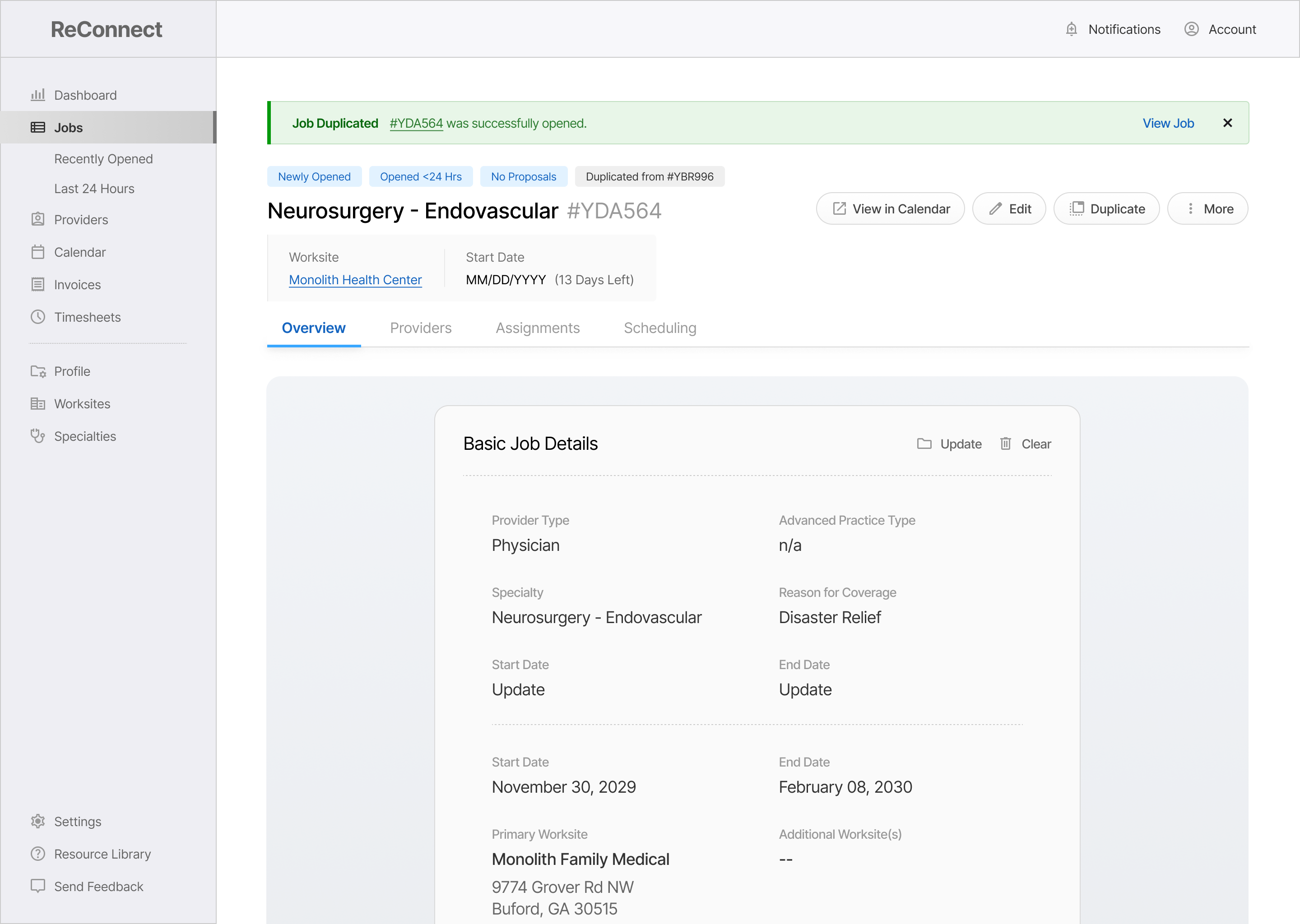
Introduced Job Duplication, allowing users to instantly re-submit existing job data when opening a new job.
Rolled out Client Profiles to let users store repetitive data for retrieval when opening future jobs.
Importing Job Data
(#YDA956)
Provider Type
Advanced Practice Type
Start Date
End Date
Reason for Coverage
Worksite(s)
Requested Provider(s)
Contact Name(s)
Automated Data Entry: Minimizing Human Effort (and Error)
Shifted data entry from manual input to automated, with users only entering data for corrections or key info (reason for coverage, work schedule, etc.)
Enabled over 80% of data entry to be automated by  importing old job data.
Resulted in ~70% Reductions in 3 Key Metrics (Completion Time, Clicks, and Page-Loads)
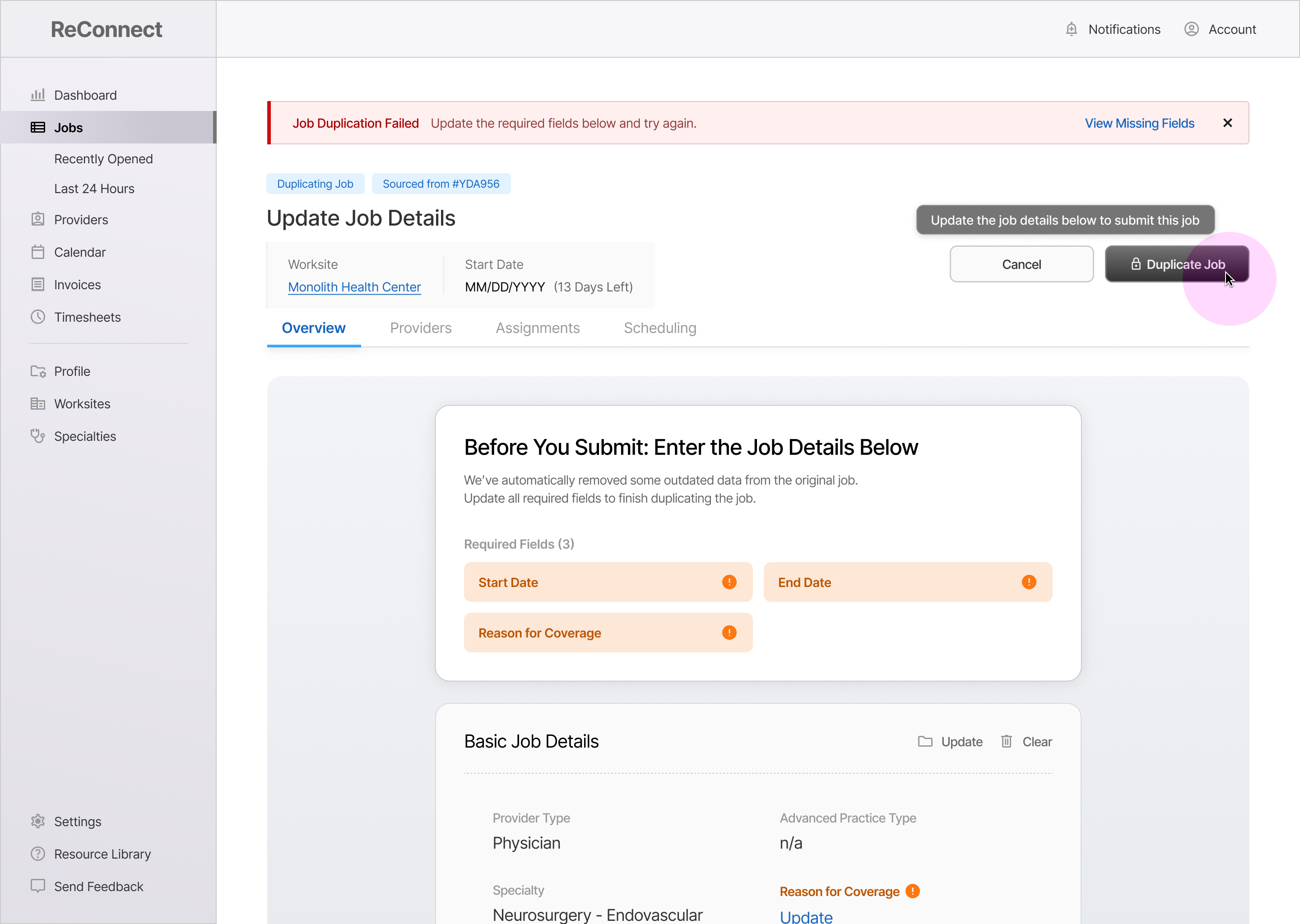
Update the Job Details below
We’ve automatically removed some outdated data from the original job.
Update all required fields to finish duplicating the job.
Required Fields (3)
Start Date
End Date
Reason for Coverage
Required Fields (3)
Review Screens: Making Data Hygiene Mandatory
Introduced screens and components that reduced data errors by "forcing" users to stop, review, and make updates to their work before submitting.
Complete / Incomplete status of required fields is displayed dynamically for users
Modular UI allows the card to grow or shrink based on which sections need attention.
Job Draft Saved
(#YDA956)
View Draft
Are you sure you want to leave?
A draft of this job will be saved for 30 calendar days.
Keep Working
Save and Quit
User Drafts: A Safety Net for Complex Work in Progress
Prompts users with the option to save a draft when quitting the intake form, or automatically stores a draft if the user has closed the browser.
Users are sent in-app notifications and email reminders as drafts get closer to expiring.
With drafts, users could pre-fill easy sections of the intake form while they gathered more info.
Importing Job Data
(#YDA956)
Provider Type
Advanced Practice Type
Start Date
End Date
Reason for Coverage
Worksite(s)
Requested Provider(s)
Contact Name(s)
Automated Data Entry: Boosting Speed While Minimizing Human Error
Shifted data entry from manual input to automated, with users only entering data for corrections or key info (reason for coverage, work schedule, etc.)
Enabled over 80% of data entry to be automated by  importing old job data.
Resulted in ~70% Reductions in Completion Time, # of Clicks, and # of Page-Loads
Update the Job Details below
We’ve automatically removed some outdated data from the original job.
Update all required fields to finish duplicating the job.
Required Fields (3)
Start Date
End Date
Reason for Coverage
Required Fields (3)
Review Screens: Making Data Hygiene Mandatory
Introduced screens and components that reduced data errors by "forcing" users to stop, review, and make updates to their work before submitting.
Complete / Incomplete status of required fields is displayed dynamically for users
Modular UI allows the card to grow or shrink based on which sections need attention.
Job Draft Saved
(#YDA956)
View Draft
Are you sure you want to leave?
A draft of this job will be saved for 30 calendar days.
Keep Working
Save and Quit
User Drafts: A Safety Net for Complex Work in Progress
Prompts users with the option to save a draft when quitting the intake form, or automatically stores a draft if the user has closed the browser.
Users are sent in-app notifications and email reminders as drafts get closer to expiring.
With drafts, users could pre-fill easy sections of the intake form while they gathered more info.
95%
of Intake Form Automated
Small Clients (<10 Worksites)
67%
of Intake Form Automated
Small Clients (<10 Worksites)
25%
of Intake Form Automated
Small Clients (<10 Worksites)
The Impact
Big-picture victories that resulted from this project. These are broad themes that were targeted based on user interviews and past feedback.
Completely Automated
Intake Forms
Users Impacted
Small + Medium Clients (>25 Worksites)
Phased Out Data Entry,
Shifted to Batch Data Review
Features Impacted
Opening + Duplicating a New Job
A Single, Branching Form
for All Job Intake Data
Features Impacted
All Job Submission Features
Ended Accidental Data Loss
Features Impacted
Opening a New Job
95%
of Intake Form Automated
Small Clients (<10 Worksites)
67%
of Intake Form Automated
Small Clients (<10 Worksites)
25%
of Intake Form Automated
Small Clients (<10 Worksites)
The Impact
Hospital staffing coordinators were allowing multiple days to pass without submitting job requirements to recruiters.
Intake Forms
Completely Automated
Small-Scale Clients (<10 Worksites)
Ended Accidental
Data Loss
Small-Scale Clients (<10 Worksites)
Integrated Three Core User Journeys into Design System
Small-Scale Clients (<10 Worksites)
95%
of Intake Form Automated
Small Clients (<10 Worksites)
67%
of Intake Form Automated
Small Clients (<10 Worksites)
25%
of Intake Form Automated
Small Clients (<10 Worksites)
The Outcomes
Hospital staffing coordinators were allowing multiple days to pass without submitting job requirements to recruiters.
95%
of Intake Form Automated
Small Clients (<10 Worksites)
67%
of Intake Form Automated
Small Clients (<10 Worksites)
25%
of Intake Form Automated
Small Clients (<10 Worksites)
95%
Small-Scale Clients (<10 Worksites)
67%
Small-Scale Clients (<10 Worksites)
33%
Small-Scale Clients (<10 Worksites)
The Numbers
83%
Task Completion Time
Opening a New Job
67%
Clicks + Page-Loads
Opening a New Job
80%
Development Assets
Job Intake (Post-Design System)
95%
of Intake Form Automated
Small Clients (<10 Worksites)
67%
of Intake Form Automated
Small Clients (<10 Worksites)
25%
of Intake Form Automated
Small Clients (<10 Worksites)